Your business,
on autopilot
ClvrJob is an AI agent that works alongside you — it reads your email, organizes every job, drafts replies in your voice, chases the things you forget to chase, and learns your judgment so it gets better every week. You stay in control; it does the busywork.
Connect the mailbox you already use. No card required · 3-day free trial · set up in minutes.
Monday morning
Six messages, one job, and the print file is somewhere in the middle.
What ClvrJob makes of it
Riverside Diner — reopening banners
Riverside Diner
Confirmed so far
Reply drafted
“Two 3x8 vinyl banners with grommets, full colour — I just need the date you need them in hand.”
One card. Artwork on it. Answer ready to send.
Who it is for
If the work comes in by email,
it works for you
ClvrJob does not care what you make or install. It cares that every job starts as a message with details buried in it.
Print, sign & apparel
Banners, decals, wraps, shirts, embroidery. Artwork arrives as an attachment and sizes arrive three replies later.
Contractors & remodelers
Scope, change orders and site photos come in by email and text-to-email. Every job gets its own card instead of its own thread.
HVAC, plumbing & electrical
Service calls, quotes and parts approvals land in the same inbox. The quote that went quiet gets chased for you.
Machine, weld & fab shops
Drawings, revisions and RFQs. The latest DXF stays attached to the job so nobody cuts from last week's file.
Landscaping & outdoor
Walkthrough notes, plant lists and phased work. Each property keeps its own history under one customer.
Creative & media
Shoots, edits and revision rounds. Briefs and reference files stay with the project instead of the inbox.
Events & rentals
Dates, counts and load-in details change constantly. The card always shows what is confirmed right now.
Medical, dental & labs
Cases, prescriptions, referrals and vendor orders arrive by email with attachments. Each case becomes a card, so shades, specs and approvals stay together instead of buried in a thread.
Home health & care
Intakes, authorizations and scheduling requests come in by email. Every client keeps their own card with visits logged — no digging through the inbox for the last update.
Staffing & recruiting
Candidates, openings and placement requests land as email with resumes attached. Each one becomes a card so nothing sits unanswered and no follow-up slips.
Auto & fleet repair
Estimates, parts approvals and fleet check-in requests arrive by email. Each vehicle gets its own card so nothing falls between the bays.
IT & managed services
Tickets, onboarding requests and license renewals land in the same inbox. Every client issue becomes a card instead of a thread you lose track of.
How it works
You keep working. It keeps up.
There is nothing to file, tag or drag. It watches the mailbox you already use.
The email arrives
A customer writes in about a job — a banner, a bathroom remodel, a service call, a rush order. You do nothing.
It becomes a job
ClvrJob reads the whole conversation, works out what the job actually is, and puts a card on your board with the steps already broken out.
The files come with it
Logos, drawings, proofs, site photos, spec sheets and PDFs are pulled off the email and attached to the card. No more digging back through your inbox.
The reply is written — in your voice
It drafts your answer, asking only for what is still missing. Every time you tweak a draft before sending, it studies the change — your greeting, your phrasing, your tone — and writes more like you next time.
Meet your Task Assistant
Just tell it what you
want done.
Describe a job in plain English — “chase quotes that go quiet for three days,” “send me a morning digest” — and your assistant builds the routine for you. It shows you exactly what it will do and how much time it saves. Nothing runs, and nothing sends, until you say go.
Describe it in your words
No settings to wire up. Say what you want handled, the way you would tell a teammate.
See the plan and the time saved
It writes back a plain-English routine with an estimate of hours saved every week.
You approve — then it works
Turn it on with one tap. Every reply it drafts still waits for your OK before it sends.
Task Assistant
Online · ready to help
Chase quiet quotes
Finds quotes with no reply for 3+ days and drafts a friendly nudge in your voice for you to review.
Inside the app
Built around how the work actually comes in
A single command center
One screen to start your day: what the agent handled overnight, what needs a quick yes or no, and every open order you can push forward with one tap.
It learns your judgment
Every time you approve, tweak or set something aside, it learns the calls you make — which jobs you chase, what you wave through, what can wait — and starts proposing the way you would.
Nothing sends without your OK
Every customer-facing message is drafted and parked for your approval. Your crew stays in the loop and in control — the agent just does the heavy lifting first.
Routines that run themselves
Set up recurring routines in plain English — chase quiet quotes, send a morning digest, follow up on stale orders. They run on schedule so you do not have to remember.
Bills, spotted in your inbox
It notices bills and receipts in the email you already get and lines them up for review — upcoming to pay and receipts to file, sorted for you.
One order, not twenty emails
Every message about a job lands on the same order — even when the customer starts a brand new subject line halfway through.
Quotes & invoices, built in
Build a quote with line items and totals. When the customer says yes, convert it to an invoice in one click. Download a clean PDF to email or print, or grab a CSV pre-formatted for QuickBooks, Printavo, InkSoft, or any spreadsheet — no integrations to set up, no extra software to buy.
Assign it, track it
Put a name on any job, order, or file request. Everyone sees what is theirs and nothing sits unowned.
It tells you why
Every step on a card comes with the reason it exists, quoting the customer. Nothing appears out of nowhere.
Filed under the right customer
Jobs are matched to the customer they belong to automatically, so you can see everything one account has going at once.
Your board, your way
Drag-and-drop board or a straight list. Star the jobs you are on next into one short focus list.
A read on your day
A plain-English briefing each morning on what is due, what is late, and what is waiting on somebody else.
Where this is going
An agent that does the busywork of your job
We are building toward an agent that runs a job from the first email to the last, learns how you would handle every call along the way, and keeps your team in the loop by asking before anything ever reaches a customer. Here is the path.
Reads the work in
It watches the mailbox you already use, turns every conversation into a job on your board with the files attached, and drafts your replies in your voice.
Learns how you decide
A single command center shows what needs a yes or no. It pushes any order forward on your OK and learns your judgment from every call you make.
Runs the whole job
The agent moves a job start to finish on its own — quoting, chasing, scheduling — and simply asks for your approval at the moments that matter.
Auto-send stays off. However far the agent goes, nothing reaches a customer without someone on your team saying yes.
This is what it looks like
when the agent runs your day
Real screens from ClvrJob. Your agent reads email, organizes work, drafts replies, and learns how you decide — on your phone or at your desk.
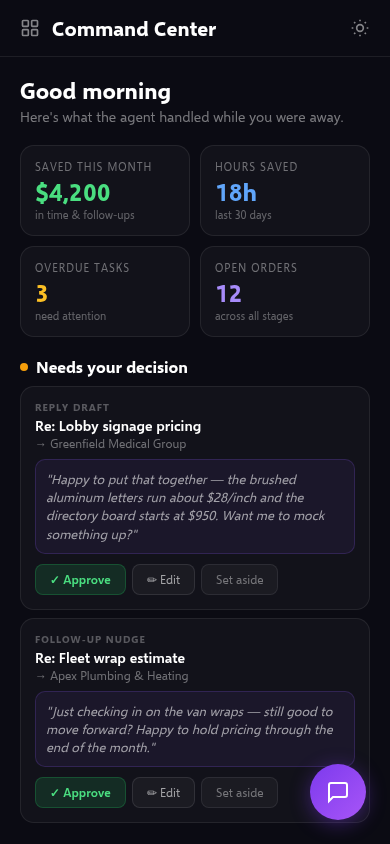
Your command center
Approve drafts, push orders forward, and see what the agent handled — all in one place.
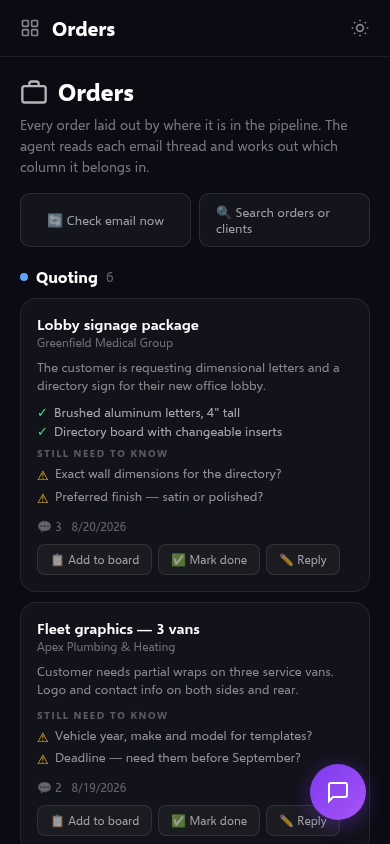
Orders, organized
The agent reads every thread and sorts it into the right stage. You just make the calls.
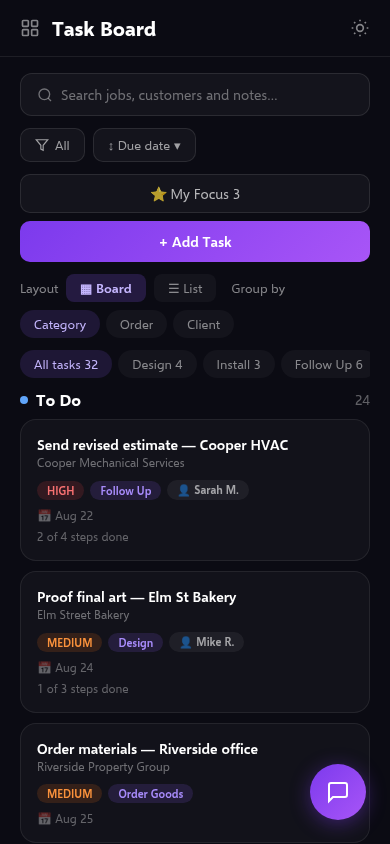
Your task board
Everything your team needs to do, who owns it, and what is next.
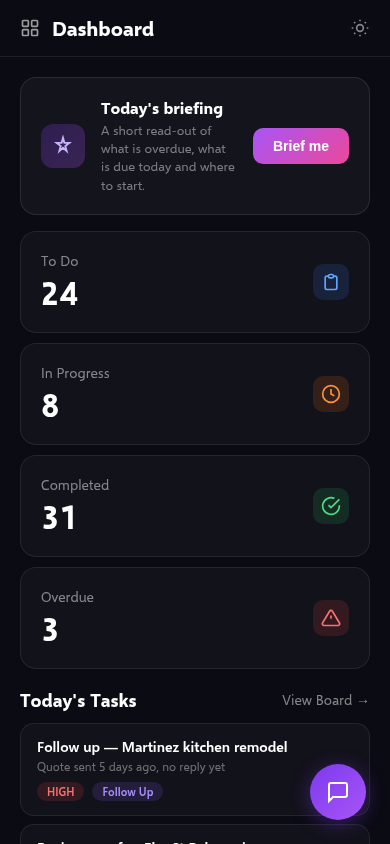
The day at a glance
What is overdue, what is in motion, and where to start your morning.
Pricing
One flat price. Every job accounted for.
No per-message fees, no add-ons. Start with a 3-day free trial — no card charged until it ends.
Pro
For a solo operator who wants their inbox to run itself.
- AI agent — reads email, builds jobs, drafts replies in your voice
- Command center — approve, chase and push work forward
- Learns your judgment from every call you make
- Plain-English workflows that run on schedule
- Bills & receipts spotted in your inbox
- Quotes & invoices — PDF + CSV export for QuickBooks, Printavo & more
- AI assistant — 50 messages/day per user
- Files kept on every job automatically
- Unlimited jobs, orders & customers
Why it pays for itself
Win back one job a month
A single quote that would have slipped through the inbox usually covers the whole month — many times over.
Hours off admin every week
No more re-reading threads, hunting for the right file, or writing the follow-up you keep meaning to send.
Cheaper than another hire
It handles the sorting, chasing and drafting a coordinator would — for a fraction of the cost, around the clock.
5 ways shops lose money in their inbox
Not ready to sign up? Grab our free guide instead. Five common ways jobs and money leak out of an email inbox — and a plain fix for each, whether or not you ever use ClvrJob.
No spam. Unsubscribe anytime.